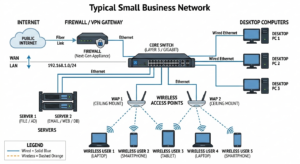
While cloud computing has become incredibly popular, having a physical or on-premise server in a small business environment offers distinct advantages that cloud services sometimes cannot match.
Here are the key benefits of having a server in a small business network:
- Centralized Data Management
Instead of files being scattered across 15 different laptops (where they can be lost or stolen), a server acts as the single “source of truth.”- Single Version: Everyone accesses the same file, preventing the confusion of “Which email attachment is the latest version?”
- Organization: Data is structured in one place rather than siloed on individual hard drives.
- Automated and Reliable Backups
This is often the #1 reason small businesses buy servers.- Centralized Backup: You can back up the server to an external drive or the cloud once. If you don’t have a server, you have to ensure 15 different workstations are backing up correctly—which rarely happens.
- Disaster Recovery: If an employee’s computer dies, their files are safe on the server. If the server dies, the data is safe on the backup.
- Enhanced Security and Control
- A server allows you to enforce security policies rather than just asking employees nicely to follow them.
- Permissions: You can control exactly who can view, edit, or delete specific folders (e.g., HR files are locked to everyone except the manager).
- Centralized Logins: With a server (usually running Windows Server or using a NAS), employees use one username/password to access the network. When someone leaves the company, you disable one account to lock them out of everything, rather than changing 10 different passwords.
- Improved Collaboration
- A server enables simultaneous work that cloud apps (like Google Docs) do differently, but often faster locally.
- File Locking: If you are using specialized software (like QuickBooks Desktop, CAD files, or large Photoshop files), the server ensures that when one person opens a file, others can view it but cannot overwrite the changes.
- Shared Databases: Applications like ACT! or Salesforce (if self-hosted) require a central server to function.
- Performance with Large Files
If your business works with large files (video editing, architecture, design), a local server is significantly faster than the cloud.- LAN Speed: Transferring a 10GB video file over a wired office network takes seconds or minutes. Uploading it to the cloud (and then downloading it to a colleague) could take hours depending on your internet speed.
- Independence from Internet Outages
Cloud services are great, but they die when the internet goes down.- Business Continuity: If your internet goes out but your power is on, employees can still access files on the server, print documents, and work on internal projects. You cannot access Google Drive or Dropbox during an outage.
- Hosting Internal Applications
- Many businesses rely on software that simply cannot be “put in the cloud” easily.
- Line of Business Apps: Specific industry software for doctors, lawyers, contractors, or accountants often requires a server to host the database.
- Email (Legacy): While rare now, some businesses still prefer to host their own email server for privacy and control.
Types of Servers for Small Business
When we talk about benefits, it helps to know what “server” actually looks like in a small business:
- The Tower Server: A big, powerful PC sitting in a closet running Windows Server. (Best for 5-20 users needing full control).
- The NAS (Network Attached Storage): A box full of hard drives that acts as a file server and backup target. (e.g., Synology, QNAP). (Best for file sharing and backup without the complexity of Windows Server).
- The “Headless” Linux Server: Used for very specific business apps or web hosting internally.
Summary Comparison
To put it simply:
No Server: You are relying on peer-to-peer networking. If “Bob’s Computer” has the only copy of the QuickBooks file and Bob goes on vacation, you cannot work.
With Server: The data is independent of any single employee. It is safe, centralized, and managed.